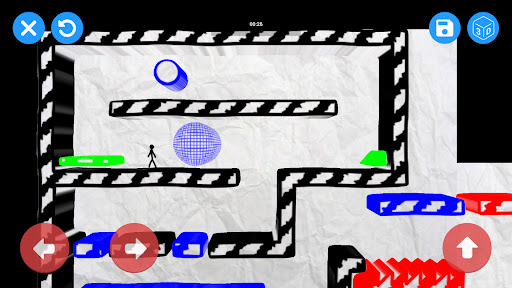
Only the current version so far — new entries appear as the game ships updates.
Trailer
This version exists for those nostalgic for the old Draw Your Game. If you play it, thank you for your support of the little creators!
If you want to go even further in video game creation, discover Draw Your Game Infinite also available on Google Play!
"I wish I could make my own video game.” Who among us hasn't thought that at some point? Draw Your Game is a user-friendly application allowing anyone and everyone to create their own video game in a few quick steps:
▶ Draw your game's world on a piece of paper, using four different colors (black, blue, green and red).
▶ Use the 'Draw Your Game' app to take a picture of your drawing.
▶ Wait 10 seconds, while Draw Your Game transforms the drawing into a game.
▶ Play your game, with a character that you can control.
Four different colors to create the world of your choosing:
▶ Black for stationary floors/ground;
▶ Blue for movable objects that the character can push around;
▶ Green for elements that the character will bounce off of;
▶ Red for objects that will destroy the character or the blue objects.
The Draw Your Game app allows you to create an infinite number of worlds, either on the same sheet of paper or by adding new sheets, one after the other, to create a real story line.
There are two available modes:
▶ “Create” mode, to create your own worlds;
▶ “Play” mode, to play in the worlds created by the community, either in “campaign” mode (worlds selected by our team), or in “catalogue” mode, where you can use search criteria to choose a world yourself.
There are several ways to play the different worlds, at the creator's choice:
▶ “Escape”: the character must find a way off the paper to escape and win the game;
▶ “Destruction”: the character must push blue objects into red ones to destroy them.
[Authorizations]
Draw Your Game requires an Internet connection in order to:
▶ Access games created by other players;
▶ Share your creations.
[Limitations]
▶ Draw Your Game only runs on smartphones and tablets with a camera that can be used to scan your drawings.
[ Drawing recommendations ]
▶ Use fairly wide felt-tip pens.
▶ Choose vivid colors.
▶ Take pictures under good lighting.

 Trailer